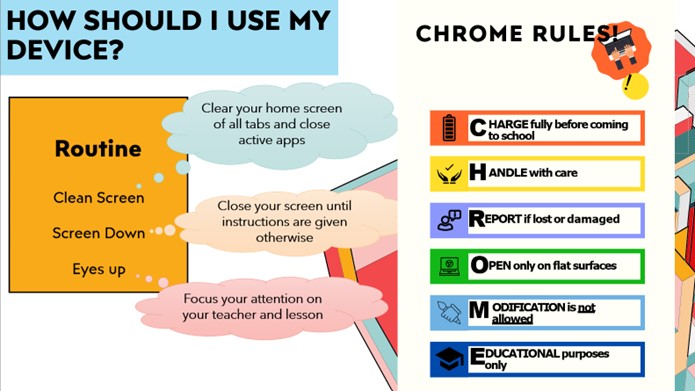
Access | Hardware | Chromebook is fully charged. Stylus is present. Earphones are kept in bag. Check that device and buttons are working.
| Chromebook to be placed on table at all times. Keep the lid closed when Chromebook is not in use.
| Secure device in locker when not in use. Keep your stylus in the stylus slot Close and ensure Chromebook is inside your bag to bring home.
|
Access | Software | Check that all updates are performed.
Set a passcode for your Chromebook device.
| Maximise the capabilities of the app for your learning.
| Save all your work into your Google Drive.
Save all files and delete unimportant files.
|
Access | Connectivity | Log into SSOE2 Wi-Fi.
Turn on Wi-Fi and Bluetooth.
| Only accept files that you know are safe and are from someone you know.
| Turn off Wi-Fi and Bluetooth when not in use. Log off from email and SSOE Wi-Fi accounts.
|
Security | Cyberwellness | Adjust brightness to better suit your eyes.
| Give yourself rest time between lessons if you feel a strain on your eyes. Do not make hurtful comments or send photos or videos deemed hurtful to others. Obtain permission from your teacher to use the camera function. Follow the teachers’ instructions on lesson processes. Use your device as instructed by your teacher and do not get distracted.
| Rest your eyes by looking at faraway objects, preferably something green, or by closing your eyes. Do simple eye exercises, such as massaging your eyes.
|
Security | Device Storage | Unlock and retrieve your devices from your locker or bag.
| Leave your devices on the table within your sight.
| Lock up your devices in the lockers when not in use.
|
Security | Student Chromebook Loan Policy | In case of a technical fault, such as the battery consistently losing its charge, please proceed to the ICT Helpdesk. Check for any fault or damage to the device before the loan. Students are to fill in the ICT equipment loan form at the ICT Helpdesk in school.
| Seek permission from your teacher to approach the ICT Helpdesk to borrow a temporary device if your device becomes faulty during lessons. Abide by the CCKSS Acceptable Use Policy (AUP) when using loan devices from the school. Use the loan devices as intended in the classroom.
| Return the device by 5 p.m. on the day of the loan for a same-day loan, or by the due date given by the ICT Helpdesk.
|
Security | Device Care | Ensure that the stylus is kept in its slot.
| Keep the Chromebook closed at 45 degrees on the table at all times.
| Close the Chromebook with the cover. Ensure that the stylus is kept in its slot.
|